BIT660 Data Archiving Training
Gain practical SAP data management expertise with BIT660 Data Archiving Training covering archiving concepts, archiving objects, data retention, archive administration, storage management, monitoring and compliance. Develop hands-on skills to reduce database growth, improve system performance and manage SAP business data securely throughout its lifecycle.
 1K+ Reviews
Instructor-Led Training Parameters
Course Highlights
- Instructor-led Online Training
- Project Based Learning
- Certified & Experienced Trainers
- Course Completion Certificate
- Customized Learning Schedule
- Doubt-Clearing Sessions
BIT660 Data Archiving Training Course Overview
Join Multisoft Systems for BIT660 Data Archiving training and learn how to design, run, and monitor SAP archiving processes end-to-end. Understand ADK, archiving objects, residence times, ILM concepts, ArchiveLink integration, jobs, storage, checks, and recovery steps. Boost performance, control data growth, and meet audit-ready retention requirements confidently.
BIT660 – Data Archiving training by Multisoft Systems is designed to help SAP professionals manage rapid data growth, improve system performance, and meet retention and compliance needs using structured archiving practices. The program explains why archiving is essential, how it differs from deletion, and how to plan an archiving strategy that aligns with business, legal, and audit requirements. Participants learn core SAP Data Archiving concepts including archiving objects, residence times, preprocessing, write and delete programs, and the end-to-end lifecycle of archived data. The course covers key components such as the Archive Development Kit (ADK), archive file creation, job scheduling, monitoring, and error handling to ensure stable and repeatable runs in production environments. It also introduces integration options like ArchiveLink and storage considerations, helping learners understand where archived data lives and how it can be accessed when required.
Hands-on guidance focuses on defining archiving variants, managing background jobs, validating results, and troubleshooting common issues such as authorization gaps, locked objects, and performance bottlenecks. By the end, learners can confidently set up and run archiving processes, protect critical business records, and maintain an optimized SAP landscape. This training is ideal for SAP Basis teams, technical consultants, and functional users involved in data management.
Instructor-led Training Live Online Classes
Suitable batches for you
| Oct, 2026 | Weekdays | Mon-Fri | Enquire Now |
| Weekend | Sat-Sun | Enquire Now | |
| Nov, 2026 | Weekdays | Mon-Fri | Enquire Now |
| Weekend | Sat-Sun | Enquire Now |
Share details to upskills your team
Enquire for Self-Paced Learning
Share your details and our training advisor will connect with you regarding self-paced learning options.
BIT660 Data Archiving Training Course curriculum
Curriculum Designed by Experts
Join Multisoft Systems for BIT660 Data Archiving training and learn how to design, run, and monitor SAP archiving processes end-to-end. Understand ADK, archiving objects, residence times, ILM concepts, ArchiveLink integration, jobs, storage, checks, and recovery steps. Boost performance, control data growth, and meet audit-ready retention requirements confidently.
BIT660 – Data Archiving training by Multisoft Systems is designed to help SAP professionals manage rapid data growth, improve system performance, and meet retention and compliance needs using structured archiving practices. The program explains why archiving is essential, how it differs from deletion, and how to plan an archiving strategy that aligns with business, legal, and audit requirements. Participants learn core SAP Data Archiving concepts including archiving objects, residence times, preprocessing, write and delete programs, and the end-to-end lifecycle of archived data. The course covers key components such as the Archive Development Kit (ADK), archive file creation, job scheduling, monitoring, and error handling to ensure stable and repeatable runs in production environments. It also introduces integration options like ArchiveLink and storage considerations, helping learners understand where archived data lives and how it can be accessed when required.
Hands-on guidance focuses on defining archiving variants, managing background jobs, validating results, and troubleshooting common issues such as authorization gaps, locked objects, and performance bottlenecks. By the end, learners can confidently set up and run archiving processes, protect critical business records, and maintain an optimized SAP landscape. This training is ideal for SAP Basis teams, technical consultants, and functional users involved in data management.
- Understand SAP Data Archiving fundamentals - purpose, benefits, and impact on performance and database growth
- Differentiate archiving vs deletion - compliance, auditability, and data lifecycle control
- Identify and work with archiving objects - structure, prerequisites, and dependencies
- Plan an archiving strategy - residence times, retention rules, and business/legal alignment
- Configure and execute archiving runs - variants, write/delete steps, and scheduling best practices
- Use ADK effectively - archive file creation, handling, and integrity checks
- Monitor and manage archiving jobs - logs, statistics, and runtime optimization
- Troubleshoot common archiving issues - locks, authorizations, errors, and failed runs recovery
- Understand storage and access options - ArchiveLink integration and retrieval requirements
- Apply best practices for operational stability - governance, documentation, and repeatable production procedures
Course Prerequisite
- Basic understanding of SAP system landscape (ECC/S/4HANA) and client/server concepts
- Familiarity with SAP transactions, background jobs, and spool/log handling (SM36/SM37 basics)
- Knowledge of SAP authorization concepts and roles (at a working level)
Course Target Audience
- SAP Basis Administrators
- SAP Technical Consultants
- SAP Functional Consultants
- SAP System Administrators / SAP Operations Teams
- SAP Application Support Analysts (L2/L3)
- SAP Data Management / Data Governance Teams
- SAP ILM / Compliance & Retention Stakeholders
- SAP Security & Authorization Teams
- Database Administrators supporting SAP (DBA)
- IT Infrastructure / Storage Administrators (ArchiveLink/content repositories)
- SAP Project/Upgrade/Migration Teams
- Audit, Risk & Compliance teams working with SAP data retention
Course Content
- Understand Data Archiving and its role in your system
- Determine the positioning of data archiving in SAP solutions
- Differentiate between data archiving and document storage
 DOWNLOAD CURRICULUM
- Describe and display the mandatory and optional components of an archiving object
- Describe the use of transactions SARA and AOBJ
- Maintain file names and file paths
- Maintain storage folders if you want to store archive files in a storage system
- Perform cross-archiving-object customizing
- Perform archiving-object-specific customizing
- Name possible variants in Data Archiving
- Maintain residence times for FI_DOCUMNT archiving object
- Maintain residence times for SD archiving objects
- Describe how to use user exits for SD archiving objects
- Target an existing content repository using the SAP CMS interface
DOWNLOAD CURRICULUM
- Determine the critical tables using "size" and "growth"
- Assign an archiving object to a table
- Choose one suitable archiving object from several that can be assigned
- Describe dependencies between archiving objects
- Use the network graphic to display archiving sequences
- Identify business, technical and legal considerations in data archiving
- Use transaction TAANA to determine appropriate selection criteria
- Use transaction TAANA to determine appropriate archiving objects
DOWNLOAD CURRICULUM
- Carry out functions in transaction SARA
- Schedule archiving jobs
- Maintain variants
- Describe the authorization checks
- Monitor archiving jobs
- Display and interpret logs
- Interpret data archiving statistics
- Describe the procedure for errors and restart scenarios
- Describe how management data is structured
- Archive management data
- Interpret the status of archiving sessions
- Store archive files
- List possible external storage media
- Describe the connection between data archiving and system performance
- Describe the meaning and the requirements of a long-term archiving plan
DOWNLOAD CURRICULUM
- List the options for accessing archived data
- Display archived documents directly from the standard display transactions
- Access archived documents using special read programs
- Understand the reload function in the context of accessing archived data
- Describe the components and the usage areas of the Archive Information System
- Create or adapt an archive information structure
- Build an archive information structure
- Search for a document directly using the Archive Information System and displaying it in a technical view
- Describe the Document Relationship Browser (DRB) and its purpose
- Use roles in the Document Relationship Browser or personalize its functions
- Define and explain the purpose of the Data Retention Tool (DART)
- Describe the connection between data archiving and DART
- Describe which data DART saves in its extract files and how
- Explain why you need views of DART extracts
DOWNLOAD CURRICULUM

Request for Enquiry
SAP Implementation, Migration & Support Experts
End-to-end SAP services across transformation, BTP, HANA, cloud, migrations and managed operations.
S/4HANA Transformation
Greenfield, Brownfield and Selective Data Transition to S/4HANA with readiness assessments, conversion planning and smooth business cutover.
- Greenfield Implementation
- Brownfield System Conversion
- Selective Data Transition
- S/4HANA Readiness Assessment
SAP BTP & Integration
Integration Suite, side-by-side extensions, Build Apps, automation and analytics on a clean-core model for modern SAP landscapes.
- BTP Foundation Setup
- Integration Suite
- Extension & Clean Core
- Data & Analytics
HANA & Database
HANA administration, performance tuning, tenant management, backup, recovery and HA/DR design to keep the SAP core stable and fast.
- HANA Administration
- Performance & Tuning
- HA/DR Design & Build
- Backup, Recovery & Refresh
Cloud & Infrastructure
RISE with SAP, hyperscaler landing zones, sizing, monitoring, security, IaC and FinOps for scalable SAP cloud operations.
- RISE with SAP Advisory
- Hyperscaler Landing Zone
- Sizing & Capacity Planning
- Monitoring & FinOps
Migrations & Upgrades
Low-risk SAP migrations, OS/DB moves, release upgrades, Unicode conversion and datacenter relocation with rehearsed cutovers.
- OS/DB Migration
- Release & EHP Upgrades
- Unicode Conversion
- Datacenter / Cloud Migration
Managed Services / AMS
24×7 L1–L3 SAP support, Basis operations, incident management, system refresh and continuous improvement under SLA governance.
- Application Management L1–L3
- Basis Operations
- System Refresh
- Continuous Improvement
Explore Course Resources
Strengthen your learning with useful resources designed to help you prepare, practice, and evaluate your understanding.
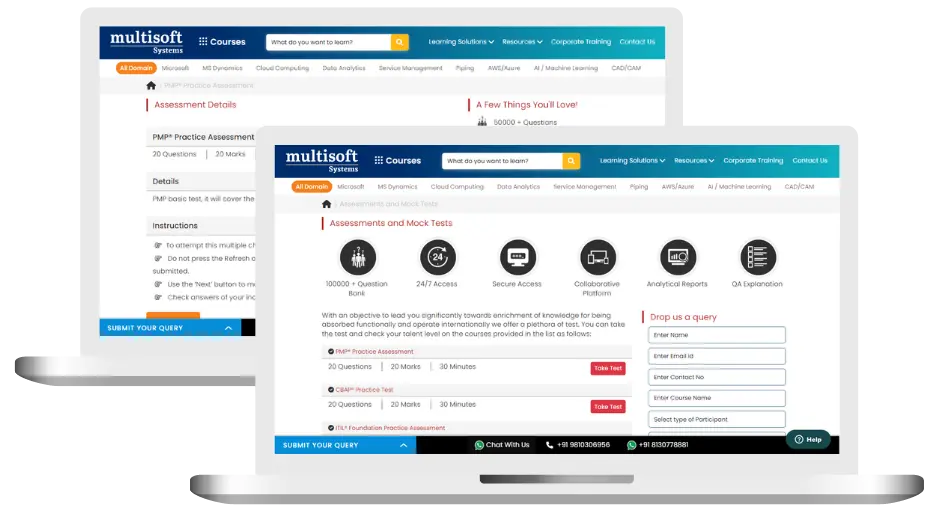
BIT660 Data Archiving Training (MCQ) Assessment
This assessment tests understanding of course content through MCQ and short answers, analytical thinking, problem-solving abilities, and effective communication of ideas. Some Multisoft Assessment Features :
- User-friendly interface for easy navigation
- Secure login and authentication measures to protect data
- Automated scoring and grading to save time
- Time limits and countdown timers to manage duration.
BIT660 Data Archiving Corporate Training
Employee training and development programs are essential to the success of businesses worldwide. With our best-in-class corporate trainings you can enhance employee productivity and increase efficiency of your organization. Created by global subject matter experts, we offer highest quality content that are tailored to match your company’s learning goals and budget.
Global Clients



Customized Training
Be it schedule, duration or course material, you can entirely customize the trainings depending on the learning requirements
Expert
Mentors
Be it schedule, duration or course material, you can entirely customize the trainings depending on the learning requirements
360º Learning Solution
Be it schedule, duration or course material, you can entirely customize the trainings depending on the learning requirements
Learning Assessment
Be it schedule, duration or course material, you can entirely customize the trainings depending on the learning requirements
Why BIT660 Data Archiving Training for Your Professional Growth
Strengthen your professional capabilities with practical learning, industry-relevant knowledge, and skills applicable to real-world business and technology environments.
Industry-Relevant Skills
Gain knowledge aligned with current industry practices, technologies, processes, and professional requirements.
Practical Learning
Understand concepts through practical scenarios, instructor-led discussions, exercises, and use cases.
Enhanced Professional Capability
Strengthen your ability to work confidently with relevant tools, workflows, platforms, and business processes.
Broader Career Opportunities
Add valuable capabilities to your profile and explore opportunities across relevant roles, projects, and industries.
Adapt to Changing Technologies
Stay familiar with evolving technologies, methodologies, and practices shaping modern enterprise environments.
Professional Recognition
Demonstrate your training achievement with a course completion certificate from Multisoft Systems.

 Zoom-in
Certification Training Achievements: Recognizing Professional Expertise
Multisoft Systems is the “one-top learning platform” for everyone. Get trained with certified industry experts and receive a globally-recognized training certificate. Some Multisoft Training Certificate Features :
- Globally recognized certificate
- Course ID & Course Name
- Certificate with Date of Issuance
- Name and Digital Signature of the Awardee
Trending Courses
Why Learners Choose Multisoft Systems
Compare key training features and see how Multisoft Systems focuses on structured learning, practical understanding, and learner support.
Training Features That Matter
Evaluate the learning experience across important areas before selecting a training program.
Instructor-Led Learning
Structured sessions guided by experienced trainers.
Practical Learning
Hands-on exposure that supports concept understanding.
Flexible Learning Options
Learning formats designed around different schedules.
Learner Support
Assistance throughout the training journey.
Learning Resources
Resources that support revision and continued learning.
Training Certificate
Recognition after successful course completion.
Choose Training That Goes Beyond Theory
Multisoft Systems combines guided learning, practical exposure, flexible delivery, learner support, and structured resources to create a more complete training experience.

SAP SuccessFactors Recruiting: Features, Processes, and Career Opportunities
Recruiting the right talent is essential for business growth, but... Read Article
ServiceNow ITOM Training: Skills, Benefits, and Career Opportunities
Modern businesses rely on IT infrastructure to support applications, digital... Read Article
SAP Hybris Training Functional & Developer: Skills, Modules, and Career Opportunities
SAP Hybris is associated with digital commerce solutions that help... Read Article
SAP Hybris Cloud for Customer: Project Implementation, Skills, and Career Guide
Implementing a customer relationship management platform involves much more than... Read ArticleBIT660 Data Archiving Training Trainer Profile
19+ Years Experienced
Our BIT660 Data Archiving Training Corporate & Certification Program trainers bring 13+ years of proven industry expertise, delivering practical insights aligned with real project environments.
Trained 3950+ Professionals
Our expert trainers have successfully trained 3350+ professionals through structured, real-time training programs designed for industry readiness and career growth.
Certified Experts & Real-Time Project Learning
Build strong practical skills through live project-based training sessions led by certified industry experts with real-world experience.
Hands-on Learning Approach
Gain practical exposure through real-time scenarios, industry case studies, and hands-on assignments that simulate actual project challenges.
Certification Training Guidance
Receive expert support to prepare effectively, practice strategically, and confidently achieve globally recognized certification success.
Customized Training Delivery
Flexible training approach tailored to individual learning goals, skill levels, and evolving industry requirements for maximum effectiveness.
BIT660 Data Archiving Training FAQ's
It is the SAP process of moving historical, rarely used transactional data from the database to archive files while keeping it accessible for reporting, audits, or display when needed.
What Attendees are Saying
Our clients love working with us! They appreciate our expertise, excellent communication, and exceptional results. Trustworthy partners for business success.
Share Feedback



