SAP Service and Asset Manager (SSAM) Training Online Course Certification
Gain practical mobile workforce and asset management expertise with SAP Service and Asset Manager (SSAM) Training covering work orders, notifications, asset management, inspections, inventory, offline capabilities, field service workflows and synchronization. Develop hands-on skills to empower field technicians, improve asset visibility and streamline maintenance and service operations.
 1K+ Reviews
Instructor-Led Training Parameters
Course Highlights
- Instructor-led Online Training
- Project Based Learning
- Certified & Experienced Trainers
- Course Completion Certificate
- Customized Learning Schedule
- Doubt-Clearing Sessions
SAP Service and Asset Manager (SSAM) Training Online Course Certification Course Overview
Join SAP Service and Asset Manager (SSAM) training by Multisoft Systems and empower technicians with a modern mobile maintenance solution. Get hands-on with work orders, confirmations, notifications, equipment and functional locations, offline capability, time and material capture, attachments, and seamless SAP S/4HANA integration - improving productivity, compliance, and service quality on-site.
SAP Service and Asset Manager (SSAM) training by Multisoft Systems is designed to help maintenance and field service teams execute work efficiently using a powerful mobile experience integrated with SAP S/4HANA. SSAM enables technicians to access assigned work orders, view equipment and functional location details, check task lists and safety notes, and capture all execution data directly from the job site. The training covers end-to-end mobile maintenance processes - from reviewing notifications and prioritizing tasks to recording confirmations, time, parts consumption, and completing technical findings with attachments such as photos and documents. Participants learn how SSAM supports offline operations, ensuring continuity in low-connectivity environments while maintaining accurate synchronization once connectivity is restored. The program also explains how standardized workflows improve compliance, speed up turnaround time, and reduce paperwork by digitizing inspections, repairs, and service activities. In addition, learners gain practical understanding of role-based access, mobile UI navigation, and best practices for real-world deployment scenarios.
By the end of this training, teams can confidently use SSAM to improve asset reliability, reduce downtime, and enhance service delivery through faster reporting, better visibility, and real-time updates across maintenance operations.
Instructor-led Training Live Online Classes
Suitable batches for you
| Oct, 2026 | Weekdays | Mon-Fri | Enquire Now |
| Weekend | Sat-Sun | Enquire Now | |
| Nov, 2026 | Weekdays | Mon-Fri | Enquire Now |
| Weekend | Sat-Sun | Enquire Now |
Share details to upskills your team
Enquire for Self-Paced Learning
Share your details and our training advisor will connect with you regarding self-paced learning options.
SAP Service and Asset Manager (SSAM) Training Online Course Certification Course curriculum
Curriculum Designed by Experts
Join SAP Service and Asset Manager (SSAM) training by Multisoft Systems and empower technicians with a modern mobile maintenance solution. Get hands-on with work orders, confirmations, notifications, equipment and functional locations, offline capability, time and material capture, attachments, and seamless SAP S/4HANA integration - improving productivity, compliance, and service quality on-site.
SAP Service and Asset Manager (SSAM) training by Multisoft Systems is designed to help maintenance and field service teams execute work efficiently using a powerful mobile experience integrated with SAP S/4HANA. SSAM enables technicians to access assigned work orders, view equipment and functional location details, check task lists and safety notes, and capture all execution data directly from the job site. The training covers end-to-end mobile maintenance processes - from reviewing notifications and prioritizing tasks to recording confirmations, time, parts consumption, and completing technical findings with attachments such as photos and documents. Participants learn how SSAM supports offline operations, ensuring continuity in low-connectivity environments while maintaining accurate synchronization once connectivity is restored. The program also explains how standardized workflows improve compliance, speed up turnaround time, and reduce paperwork by digitizing inspections, repairs, and service activities. In addition, learners gain practical understanding of role-based access, mobile UI navigation, and best practices for real-world deployment scenarios.
By the end of this training, teams can confidently use SSAM to improve asset reliability, reduce downtime, and enhance service delivery through faster reporting, better visibility, and real-time updates across maintenance operations.
- Understand SSAM architecture, key capabilities, and how it supports mobile maintenance and field service
- Navigate the SSAM mobile interface and perform role-based daily technician activities
- Access, review, and manage work orders, operations, task lists, and priority information
- Create and process notifications, including capturing issues, symptoms, causes, and notes
- View and validate equipment and functional location data for accurate asset context
- Record confirmations, time, and completion details for work execution
- Capture spare parts/material consumption and update work-related information
- Add attachments (photos/documents), measurements, and technical findings from the field
- Work effectively in offline mode and sync updates safely when connectivity returns
- Apply best practices to improve productivity, compliance, and maintenance data quality
- Understand integration touchpoints with SAP S/4HANA and maintenance processes end-to-end
Course Prerequisite
- Basic understanding of maintenance/field service processes (work orders, notifications, breakdown vs preventive work)
- Familiarity with SAP Plant Maintenance / SAP EAM or SAP S/4HANA Asset Management concepts
- Awareness of master data: equipment, functional locations, task lists, BOM/spares
Course Target Audience
- Maintenance Technicians and Field Technicians
- Field Service Engineers
- Plant Maintenance (EAM) Users
- Service and Maintenance Supervisors / Team Leads
- Maintenance Planners and Schedulers
- SAP PM / SAP EAM Functional Consultants
- SAP S/4HANA Asset Management Consultants
- Mobility / SSAM Application Consultants
- SAP Technical Consultants supporting SSAM (Integration/BTP/Mobile services)
- IT Support, SAP Basis, and System Administrators managing mobile deployments
- Asset Reliability and Operations Engineers
- Project Managers and Implementation Teams for mobile maintenance initiatives
Course Content
- Overview of SAP SSAM
- Purpose and business value of SAP SSAM
- Evolution from SAP Work Manager to SAP SSAM
- Key features and capabilities
- SSAM in SAP Intelligent Asset Management portfolio
- Supported platforms (Android, iOS, Windows)
- Typical business scenarios and industries
 DOWNLOAD CURRICULUM
- SSAM system landscape overview
- Backend integration with SAP S/4HANA and ECC
- Role of SAP Mobile Services (SMP/BTP Mobile Services)
- Offline data architecture (metadata, delta sync, transactions)
- High-level data flow between backend and mobile app
DOWNLOAD CURRICULUM
- Standard user personas (Technician, Supervisor, Inventory Clerk)
- Role-based functionalities and Fiori UX roles
- Defining custom personas in SSAM
- Personalization and access control in the app
DOWNLOAD CURRICULUM
- Work Order Management
- Viewing and updating work orders
- Confirmation and time entry
- Notification Management
- Create and manage notifications
- Attachments, photos, and notes
- Equipment and Functional Location Management
- Hierarchy and structure display
- Equipment details and BOM
- Measurement Documents
- Recording readings
- Managing measurement points
- Time Sheets and Labor Confirmation
- Work Approval and Sign-off process
DOWNLOAD CURRICULUM
- Master data synchronization (Equipment, Functional Locations, etc.)
- Configuring Work Orders, Notifications, and Operations in backend
- Work centers and planning plants set up
- OData configuration and synchronization profiles
- Master data filters and data subsets
- Backend customizing in SAP S/4HANA for SSAM
DOWNLOAD CURRICULUM
- Online and offline mode functionality
- Data synchronization (initial load, delta sync)
- Push notifications and background sync
- GPS and Map integration- GIS/GEF
- Camera, signature, and file attachments
- Mobile security (MDM/Intune integration)
DOWNLOAD CURRICULUM
- Navigation patterns and screens
- Customizing themes and colors
- Language and Localization support
- Accessibility and UI best practices
- SSAM launchpad and home screen layout
DOWNLOAD CURRICULUM
- Installation and configuration overview (Admin view)
- SAP BTP Mobile Services setup
- Application registration and onboarding users
- Managing users and roles
- Performance monitoring and troubleshooting
- Version management and upgrades
- Managing app logs and sync issues
DOWNLOAD CURRICULUM
- Integration with GIS (Geographical Information Systems)
- Integration with SAP Field Service Management (FSM)
- Asset Insights and Predictive Maintenance integration
- IoT sensor data integration
- Push-based sync and background jobs
- Analytics and reporting capabilities
DOWNLOAD CURRICULUM
- Extending OData Services (SAP Gateway / BTP)
- Custom UI extension (Object Tables, Pages, Actions)
- Branding and theme customization
- Deployment of customizations (MDK Extensions)
DOWNLOAD CURRICULUM

Request for Enquiry
SAP Implementation, Migration & Support Experts
End-to-end SAP services across transformation, BTP, HANA, cloud, migrations and managed operations.
S/4HANA Transformation
Greenfield, Brownfield and Selective Data Transition to S/4HANA with readiness assessments, conversion planning and smooth business cutover.
- Greenfield Implementation
- Brownfield System Conversion
- Selective Data Transition
- S/4HANA Readiness Assessment
SAP BTP & Integration
Integration Suite, side-by-side extensions, Build Apps, automation and analytics on a clean-core model for modern SAP landscapes.
- BTP Foundation Setup
- Integration Suite
- Extension & Clean Core
- Data & Analytics
HANA & Database
HANA administration, performance tuning, tenant management, backup, recovery and HA/DR design to keep the SAP core stable and fast.
- HANA Administration
- Performance & Tuning
- HA/DR Design & Build
- Backup, Recovery & Refresh
Cloud & Infrastructure
RISE with SAP, hyperscaler landing zones, sizing, monitoring, security, IaC and FinOps for scalable SAP cloud operations.
- RISE with SAP Advisory
- Hyperscaler Landing Zone
- Sizing & Capacity Planning
- Monitoring & FinOps
Migrations & Upgrades
Low-risk SAP migrations, OS/DB moves, release upgrades, Unicode conversion and datacenter relocation with rehearsed cutovers.
- OS/DB Migration
- Release & EHP Upgrades
- Unicode Conversion
- Datacenter / Cloud Migration
Managed Services / AMS
24×7 L1–L3 SAP support, Basis operations, incident management, system refresh and continuous improvement under SLA governance.
- Application Management L1–L3
- Basis Operations
- System Refresh
- Continuous Improvement
Explore Course Resources
Strengthen your learning with useful resources designed to help you prepare, practice, and evaluate your understanding.
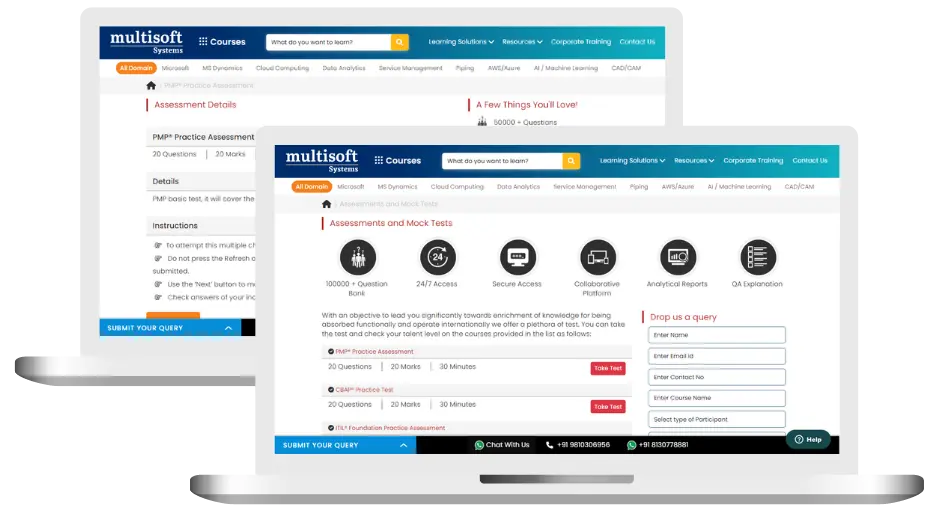
SAP Service and Asset Manager Training (MCQ) Assessment
This assessment tests understanding of course content through MCQ and short answers, analytical thinking, problem-solving abilities, and effective communication of ideas. Some Multisoft Assessment Features :
- User-friendly interface for easy navigation
- Secure login and authentication measures to protect data
- Automated scoring and grading to save time
- Time limits and countdown timers to manage duration.
SAP Service and Asset Manager Corporate Training
Employee training and development programs are essential to the success of businesses worldwide. With our best-in-class corporate trainings you can enhance employee productivity and increase efficiency of your organization. Created by global subject matter experts, we offer highest quality content that are tailored to match your company’s learning goals and budget.
Global Clients



Customized Training
Be it schedule, duration or course material, you can entirely customize the trainings depending on the learning requirements
Expert
Mentors
Be it schedule, duration or course material, you can entirely customize the trainings depending on the learning requirements
360º Learning Solution
Be it schedule, duration or course material, you can entirely customize the trainings depending on the learning requirements
Learning Assessment
Be it schedule, duration or course material, you can entirely customize the trainings depending on the learning requirements
Why SAP Service and Asset Manager (SSAM) Training Online Course Certification for Your Professional Growth
Strengthen your professional capabilities with practical learning, industry-relevant knowledge, and skills applicable to real-world business and technology environments.
Industry-Relevant Skills
Gain knowledge aligned with current industry practices, technologies, processes, and professional requirements.
Practical Learning
Understand concepts through practical scenarios, instructor-led discussions, exercises, and use cases.
Enhanced Professional Capability
Strengthen your ability to work confidently with relevant tools, workflows, platforms, and business processes.
Broader Career Opportunities
Add valuable capabilities to your profile and explore opportunities across relevant roles, projects, and industries.
Adapt to Changing Technologies
Stay familiar with evolving technologies, methodologies, and practices shaping modern enterprise environments.
Professional Recognition
Demonstrate your training achievement with a course completion certificate from Multisoft Systems.
 Zoom-in
Certification Training Achievements: Recognizing Professional Expertise
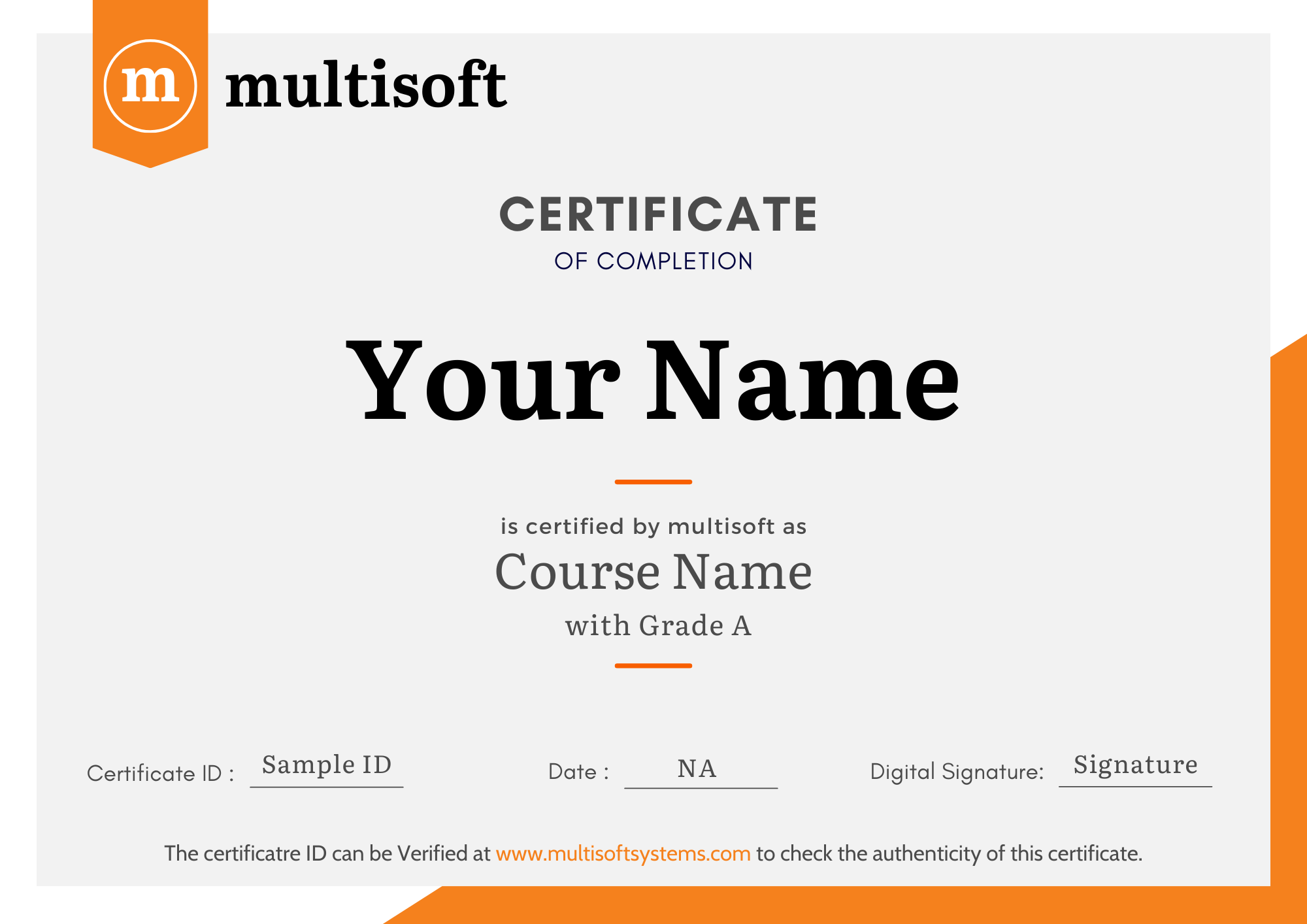
Multisoft Systems is the “one-top learning platform” for everyone. Get trained with certified industry experts and receive a globally-recognized training certificate. Some Multisoft Training Certificate Features :
- Globally recognized certificate
- Course ID & Course Name
- Certificate with Date of Issuance
- Name and Digital Signature of the Awardee
Trending Courses
Why Learners Choose Multisoft Systems
Compare key training features and see how Multisoft Systems focuses on structured learning, practical understanding, and learner support.
Training Features That Matter
Evaluate the learning experience across important areas before selecting a training program.
Instructor-Led Learning
Structured sessions guided by experienced trainers.
Practical Learning
Hands-on exposure that supports concept understanding.
Flexible Learning Options
Learning formats designed around different schedules.
Learner Support
Assistance throughout the training journey.
Learning Resources
Resources that support revision and continued learning.
Training Certificate
Recognition after successful course completion.
Choose Training That Goes Beyond Theory
Multisoft Systems combines guided learning, practical exposure, flexible delivery, learner support, and structured resources to create a more complete training experience.

SAP SuccessFactors Recruiting: Features, Processes, and Career Opportunities
Recruiting the right talent is essential for business growth, but... Read Article
ServiceNow ITOM Training: Skills, Benefits, and Career Opportunities
Modern businesses rely on IT infrastructure to support applications, digital... Read Article
SAP Hybris Training Functional & Developer: Skills, Modules, and Career Opportunities
SAP Hybris is associated with digital commerce solutions that help... Read Article
SAP Hybris Cloud for Customer: Project Implementation, Skills, and Career Guide
Implementing a customer relationship management platform involves much more than... Read ArticleSAP Service and Asset Manager (SSAM) Training Online Course Certification Trainer Profile
19+ Years Experienced
Our SAP Service and Asset Manager Training Corporate & Certification Program trainers bring 13+ years of proven industry expertise, delivering practical insights aligned with real project environments.
Trained 3950+ Professionals
Our expert trainers have successfully trained 3350+ professionals through structured, real-time training programs designed for industry readiness and career growth.
Certified Experts & Real-Time Project Learning
Build strong practical skills through live project-based training sessions led by certified industry experts with real-world experience.
Hands-on Learning Approach
Gain practical exposure through real-time scenarios, industry case studies, and hands-on assignments that simulate actual project challenges.
Certification Training Guidance
Receive expert support to prepare effectively, practice strategically, and confidently achieve globally recognized certification success.
Customized Training Delivery
Flexible training approach tailored to individual learning goals, skill levels, and evolving industry requirements for maximum effectiveness.
SAP Service and Asset Manager (SSAM) Training Online Course Certification FAQ's
SSAM is a mobile solution that helps technicians and field teams execute maintenance and service tasks on-site, such as processing work orders, notifications, confirmations, time, and parts usage, with SAP S/4HANA integration.
What Attendees are Saying
Our clients love working with us! They appreciate our expertise, excellent communication, and exceptional results. Trustworthy partners for business success.
Share Feedback



